

One Click, Fourteen Technologies: The Backend Roadmap Finally Made Sense to Me
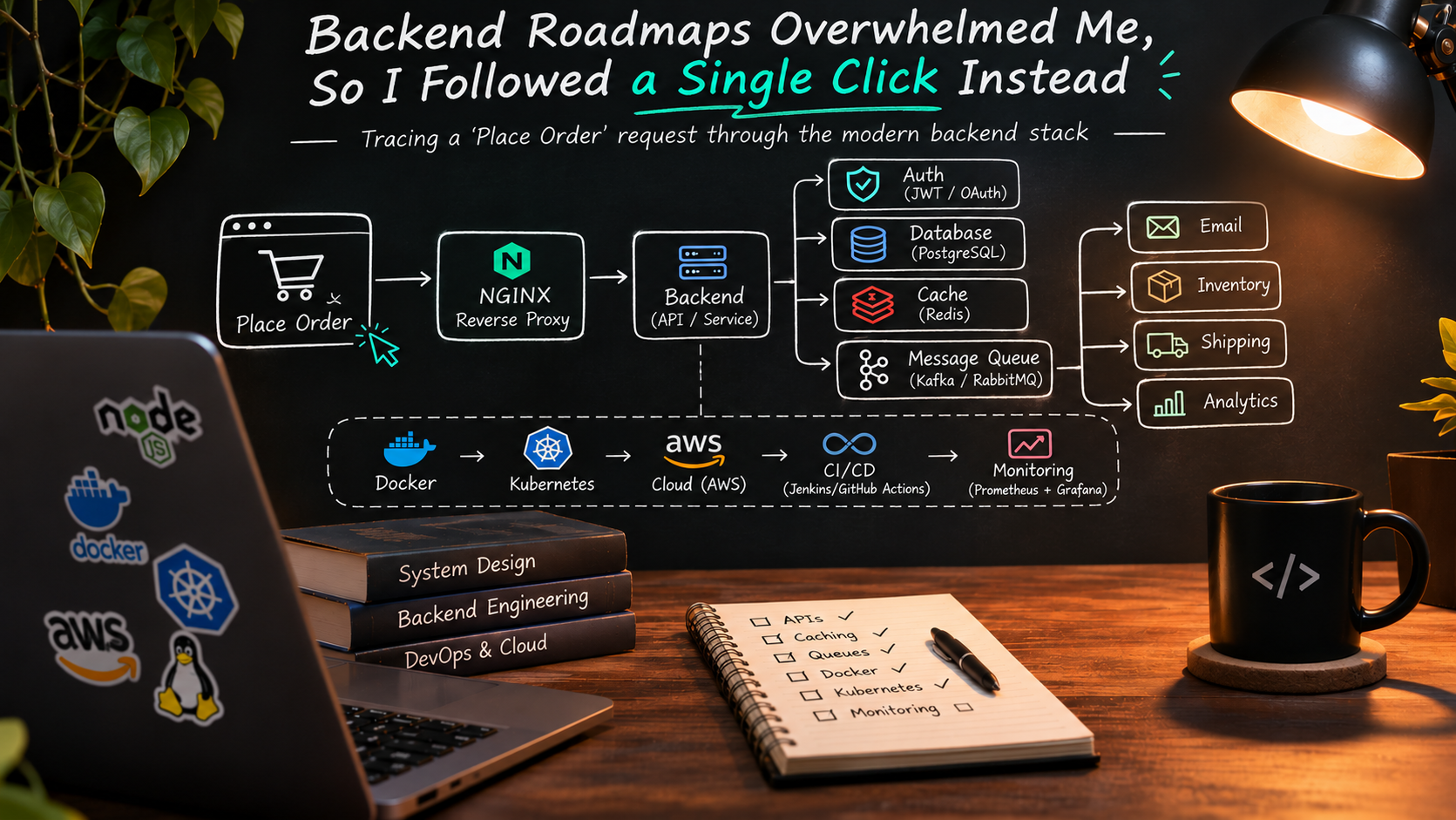
Spring Boot, Docker, Kubernetes, Redis, Kafka, PostgreSQL, Jenkins, AWS, Prometheus... I used to see that list and want to close the tab. Then I followed a single "Place Order" click through the whole stack, and the list turned into a story.
The roadmap that scared me
If you've ever Googled "backend developer roadmap", you know the feeling. You get a huge diagram with 40+ boxes: frameworks, databases, caches, queues, containers, orchestrators, cloud providers, CI/CD tools, monitoring stacks.
My first reaction, honestly: "Do I really need to learn all of this?"
The short answer is no. And the longer answer is the point of this article:
The goal is not to memorize every technology. The goal is to understand why each category exists.
Once you know the problem a category solves, picking up another tool in that category is much easier. If you understand why a cache exists, Redis vs. Memcached is a detail. If you understand why a message queue exists, Kafka vs. RabbitMQ is a detail.
I recently watched a video that explained backend engineering in exactly this way, and it gave me the bird's-eye view I was missing. This post is me documenting what I learned, in my own words, with a few things I've run into while working on backend projects (Node.js, Express, MongoDB, PostgreSQL, and a bit of AWS/NGINX/Docker).
So let's not go through the roadmap one tool at a time. Let's follow one request.
The story: you click "Place Order"
Imagine you're on an e-commerce site. You find a laptop, add it to the cart, enter your address, pay, and click Place Order.
For you, that is one click. Behind it, an entire ecosystem wakes up.
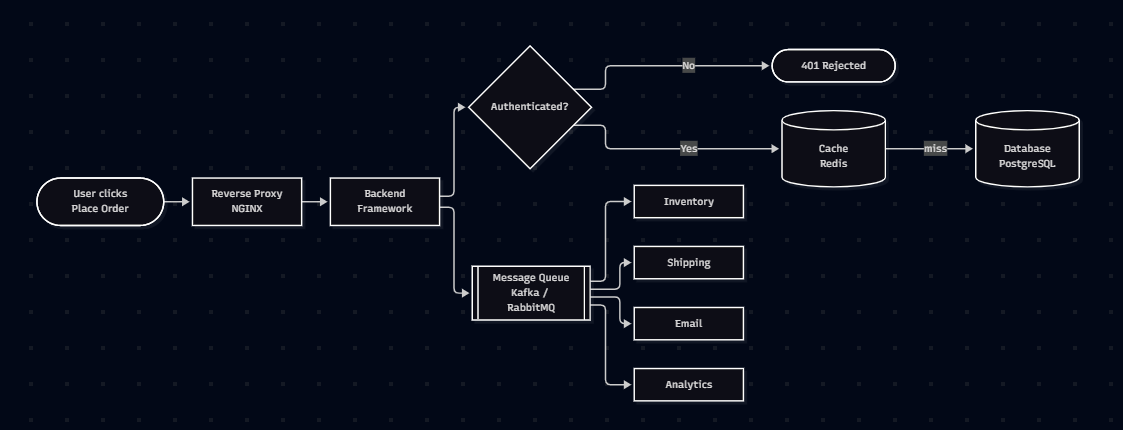
(The diagram above is the whole article in one picture. Everything below zooms into one box at a time.)
Here's the journey, stop by stop.
Stop 1: The Reverse Proxy (NGINX)
The very first thing that touches your request is usually a reverse proxy, such as NGINX.
A reverse proxy sits in front of your backend and receives every incoming request. Based on the type of request, it forwards it to the right backend service:
GET /products→ product servicePOST /payments→ payment service
Users never talk to your backend applications directly. Everything goes through the proxy first.
server {
    listen 80;
    server_name shop.example.com;

    location /api/products {
        proxy_pass http://product-service:3000;
    }

    location /api/payments {
        proxy_pass http://payment-service:4000;
    }
}
Why does it exist? One public entry point gives you a single place to route traffic, terminate HTTPS, balance load across multiple instances, and hide your internal services from the internet.
I first met NGINX while deploying a Node.js app on an EC2 instance. My Express app ran on port 3000, and NGINX was what made it reachable on port 80/443 under a proper domain. At the time it felt like "just configuration". Now I see it was the front door of the whole building.
Stop 2: The Backend (the brain)
The request has reached the backend. So what is the backend?
The backend is the part of the application that runs on a server.
The frontend is what users see and touch. The backend works behind the scenes. It:
- Receives requests
- Applies business rules
- Talks to databases and other services
- Sends a response back to the frontend
Think of it as the brain of the application.
Backend frameworks and languages
Nobody builds this from scratch. Developers use frameworks: collections of tools and pre-built code that help you build faster.
| Language | Common backend framework |
|---|---|
| Java | Spring Boot |
| C# | ASP.NET Core |
| JavaScript / TypeScript | Express, NestJS |
| Python | FastAPI, Django |
The framework changes. The language changes. The backend's responsibility stays exactly the same.
This was a big relief for me. I mostly work with Node.js and Express, and I used to feel like "not knowing Spring Boot" was a gap. It isn't. Routing, middleware, validation, error handling, talking to a DB: those ideas transfer everywhere.
// The "same job" in Express
app.post("/orders", authenticate, async (req, res) => {
  const order = await orderService.create(req.user.id, req.body);
  res.status(201).json({ message: "Your order has been placed", orderId: order.id });
});
Stop 3: Authentication, "Who is making this request?"
Before the backend places your order, it has to answer one question:
Who is making this request?
Anyone can send a POST /orders. The backend must verify the request came from a logged-in user. This is authentication.
Common technologies:
- Session-based authentication: the server remembers you (session ID in a cookie)
- JWT (JSON Web Tokens): the client carries a signed token proving who it is
- OAuth: "Login with Google/GitHub" style delegated access
- OpenID Connect: an identity layer on top of OAuth
If your identity is verified, processing continues. If not, the request is rejected immediately, which stops strangers from accessing your account or ordering on your behalf.
// A tiny JWT auth middleware
import jwt from "jsonwebtoken";

export function authenticate(req, res, next) {
  const token = req.headers.authorization?.split(" ")[1];
  if (!token) return res.status(401).json({ error: "Unauthorized" });

  try {
    req.user = jwt.verify(token, process.env.JWT_SECRET);
    next();
  } catch {
    return res.status(401).json({ error: "Invalid or expired token" });
  }
}
Side note: authentication answers "who are you?". Its sibling, authorization, answers "what are you allowed to do?". They're different problems and people mix them up all the time.
Stop 4: The Database, the application's long-term memory
Now the backend knows who you are. To process "Place Order" it needs:
- your delivery address
- the items in your cart
- your payment details
Where does that come from? A database.
A database is where an application permanently stores its data.
Customer accounts, products, orders, payments, addresses: all of it lives in the database, so it's still there even if the server restarts tomorrow. Popular choices are PostgreSQL, MySQL, SQL Server, Oracle (relational), and others like MongoDB (document-based).
The mental model that stuck with me: the database is the application's long-term memory. The app's own memory (RAM) disappears on restart. The database doesn't.
I work with both PostgreSQL and MongoDB, and the "which one" debate matters far less than the question "what shape is my data and how will I query it?" Same lesson as before: understand the problem first.
Stop 5: The Cache (Redis), hits and misses
Here's where a real problem shows up.
Imagine millions of users opening your app daily. Many of them request the same information over and over: a customer opening their profile five times a day, or thousands of people looking at the same popular laptop.
If every request goes straight to the database, the database does the same work again and again. As users grow, it becomes a performance bottleneck.
The fix: before asking the database, the backend first checks a cache, such as Redis.
A cache stores temporary copies of frequently accessed data so it can be returned almost instantly.
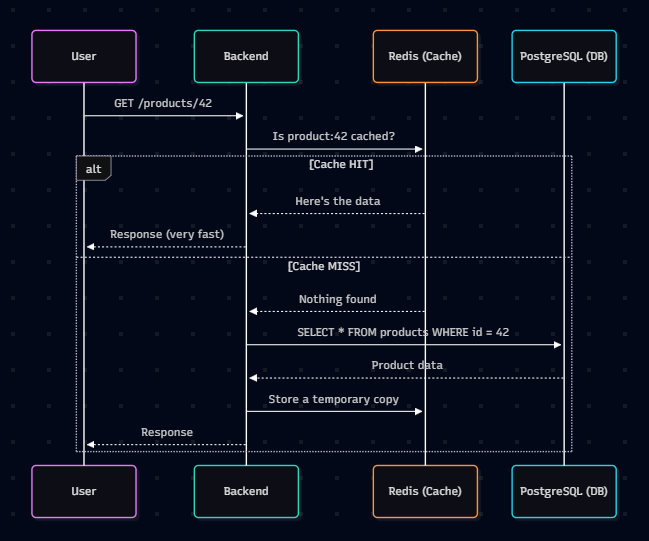
- Cache hit → data is in the cache → returned almost instantly.
- Cache miss → backend fetches from the database, returns it, and stores a copy in the cache so the next request is fast.
async function getProduct(id) {
  const cached = await redis.get(`product:${id}`);
  if (cached) return JSON.parse(cached);            // HIT

  const product = await db.product.findById(id);    // MISS
  await redis.set(`product:${id}`, JSON.stringify(product), "EX", 300); // keep for 5 min
  return product;
}
The thing to remember
Redis is not a replacement for the database.
The original data always lives in the database. Redis only keeps temporary copies to improve performance and reduce unnecessary queries. That "EX", 300 (expiry) in the code above is the hint: cached data is meant to be disposable.
Stop 6: Message Queues (Kafka / RabbitMQ), the work after the work
The backend has saved your order in the database. From the customer's point of view, the most important job is done.
But placing an order triggers a lot more:
- 📦 Update inventory
- 🏭 Tell the warehouse to prepare the package
- 🚚 Create a shipping request
- ✉️ Send a confirmation email
- 📊 Record the purchase in analytics
Should the backend wait for all of this before responding to you? Imagine staring at a spinner for 10-15 seconds every time you order. Terrible experience.
So instead, the backend immediately responds with:
"Your order has been placed successfully."
...and hands the remaining tasks to a message queue such as Kafka or RabbitMQ.
The ticket-counter analogy
A message queue is like people waiting in line at a ticket counter. When you join the line, you're not served instantly; you wait your turn. In the same way, the backend drops each task into the queue, and other services pick them up one by one and process them in the background.
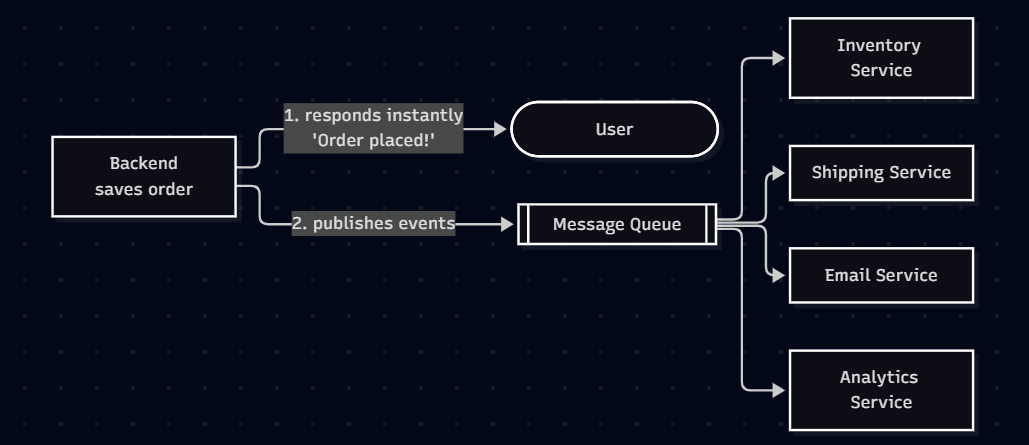
That's a big reason modern apps feel fast: they do the essential work now and the rest later.
In my own projects I've used job queues (BullMQ-style background jobs) for things like sending emails and long-running tasks. It's the same idea at a smaller scale: don't make the user wait for work they don't need to wait for.
Where does all this software actually run?
So far we followed the order. But all that software still needs somewhere to live. The next three stops are about running the system.
Stop 7: Docker, killing "it works on my machine"
Say you build a backend on your laptop and it works perfectly. A teammate runs it on their machine and it crashes, because they have a different Java/.NET/Node version, or a library is missing.
Every developer has lived this. The classic line:
"But it works on my machine!"
Docker solves it. It packages your application together with everything it depends on: runtime, libraries, config files, into a container.
Think of a container as a portable box that carries your app along with everything it needs.
Because the whole box moves together, the app behaves the same on your laptop, a testing server, or production.
FROM node:20-alpine
WORKDIR /app
COPY package*.json ./
RUN npm ci --omit=dev
COPY . .
EXPOSE 3000
CMD ["node", "server.js"]
Build it once, run it anywhere:
docker build -t shop-api .
docker run -p 3000:3000 shop-api
Stop 8: Kubernetes, managing containers at scale
Now imagine your store goes viral during a big holiday sale. Millions of customers ordering at once. One container can't handle that. You need hundreds or thousands of containers across many servers.
And then:
- Some containers crash
- Some need software updates
- When traffic spikes, you need more containers
- When traffic drops, you don't want idle containers wasting money
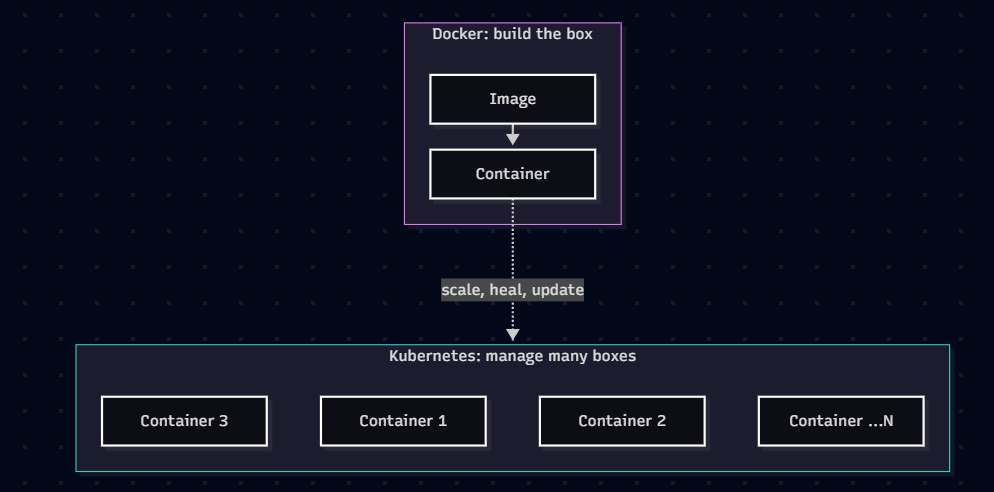
Doing this by hand is nearly impossible. This is exactly what Kubernetes solves. It automates container management across multiple servers:
- ✅ Starts new containers when more capacity is needed
- ✅ Restarts containers when they fail
- ✅ Removes extra containers when traffic decreases
The easiest way to remember the difference:
Docker creates containers. Kubernetes manages them.
Stop 9: Cloud Providers, where the servers actually live
A natural question: where are all these servers physically located?
Years ago, companies bought their own servers and ran their own data centers. Today, most rent infrastructure from cloud providers like AWS, Microsoft Azure, or Google Cloud. They supply virtual machines, networking, storage, databases and many more managed services.
Instead of buying hardware, you rent exactly what you need.
When I first deployed a Node app to an AWS EC2 instance, this is what I was doing without having the vocabulary: renting a small slice of someone else's data center, installing Node and NGINX on it, and pointing a domain at it. The same idea scales up to the whole system in this article.
Stop 10: CI/CD, shipping without fear
Building the app is only half the job. Developers constantly fix bugs, add features, and improve things. Imagine manually copying every new version to the servers after each tiny change: slow, repetitive, and very easy to mess up.
Teams use CI/CD pipelines instead:
| Term | Meaning | What happens |
|---|---|---|
| CI: Continuous Integration | Every code change is automatically built and tested | Broken code is caught early |
| CD: Continuous Delivery / Deployment | Approved changes are automatically deployed to testing or production | Releases are fast and repeatable |
Popular tools: GitHub Actions, GitLab CI, Azure DevOps, Jenkins.
# .github/workflows/ci.yml, a minimal CI example
name: CI
on:
  push:
    branches: [main]
  pull_request:

jobs:
  build-and-test:
    runs-on: ubuntu-latest
    steps:
      - uses: actions/checkout@v4
      - uses: actions/setup-node@v4
        with:
          node-version: 20
      - run: npm ci
      - run: npm test
Result: teams release faster and with fewer manual mistakes.
Stop 11: Monitoring (Prometheus + Grafana)
Once the app is live, engineers must make sure it stays healthy:
- Is the app responding slowly?
- Did a service crash?
- Is CPU or memory usage unusually high?
Waiting for customers to complain is never a good strategy. So engineers continuously monitor their systems:
- Prometheus → collects metrics from applications and infrastructure
- Grafana → visualizes those metrics as dashboards

Done well, engineers often detect and fix a problem before most customers even notice.
The complete picture
Let's replay that single click one more time:
- Reverse proxy (NGINX) received it and routed it
- The backend (Spring Boot / Express / FastAPI...) handled it
- Authentication (JWT / OAuth) verified who you are
- The database (PostgreSQL / MySQL) supplied the data
- A cache (Redis) made repeated reads fast
- A message queue (Kafka / RabbitMQ) took over the background work
- All of it ran in Docker containers
- ...managed by Kubernetes
- ...hosted on cloud infrastructure (AWS / Azure / GCP)
- ...deployed automatically through CI/CD pipelines
- ...and continuously watched by Prometheus + Grafana
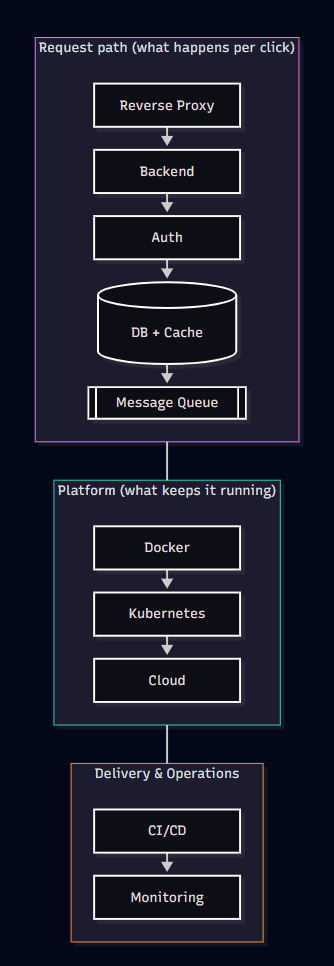
That's why the roadmap looks so overwhelming at first. They aren't unrelated technologies. They're different parts of one complete system.
A cheat sheet: category → problem → example tools
| Category | The problem it solves | Example tools |
|---|---|---|
| Reverse proxy | One safe entry point; routing and load balancing | NGINX |
| Backend framework | Build apps without starting from scratch | Spring Boot, ASP.NET Core, Express, NestJS, FastAPI, Django |
| Authentication | Verify who is making the request | Sessions, JWT, OAuth, OpenID Connect |
| Database | Store data permanently | PostgreSQL, MySQL, SQL Server, Oracle, MongoDB |
| Cache | Avoid repeating the same expensive work | Redis |
| Message queue | Do slow work in the background | Kafka, RabbitMQ |
| Containers | "Works on my machine" | Docker |
| Orchestration | Run and manage many containers | Kubernetes |
| Cloud | Rent infrastructure instead of buying it | AWS, Azure, Google Cloud |
| CI/CD | Build, test and deploy automatically | GitHub Actions, GitLab CI, Azure DevOps, Jenkins |
| Monitoring | Know about problems before users do | Prometheus, Grafana |
The better question to ask
The tools will change. One company picks Spring Boot, another picks ASP.NET Core. One team chooses PostgreSQL, another MySQL. One org runs Kafka, another prefers RabbitMQ.
The tools are different. The purpose stays the same.
So the next time you look at a backend roadmap, don't ask:
❌ "Which technology should I learn next?"
Ask:
✅ "What problem does this technology solve?"
Once you think that way, backend development stops being about memorizing names and becomes about understanding how an entire system works.
My takeaways
- You don't need to learn everything. You need to understand why each category exists.
- Learn one tool per category properly; the rest become variations on a theme.
- Follow a real request end to end. It's the fastest way to see how the pieces connect.
- Build small. Even a side project with Express + PostgreSQL + Redis + Docker + a GitHub Actions workflow touches half of this map.
If you're just starting out, my suggestion is to pick a tiny project (say, a to-do API) and add one layer at a time: auth → database → cache → Docker → CI/CD → deploy to a cloud VM. By the end, you'll have lived through most of this article.
A Few Resources to Explore
If you're also exploring backend engineering, these are good places to start:
- roadmap.sh/backend — Backend development roadmap.
- NGINX Documentation — Reverse proxies and web servers.
- PostgreSQL Documentation — Relational databases.
- Redis Documentation — Caching and data structures.
- Docker Documentation — Containers and application packaging.
- Kubernetes Documentation — Container orchestration.
- AWS Documentation — Cloud infrastructure.
- Prometheus Documentation — Monitoring and metrics.
If this helped you connect the dots, share it with someone who is staring at a roadmap right now. And if you want more deep dives like this, follow The Commit Log for what's next.
Written by Ashmit Patra. Find me on GitHub and LinkedIn.
About the author
- I build backend systems and love understanding how real-world applications scale. Currently diving into DevOps and cloud, sharing my journey and learnings along the way.
Comments
Join the discussionNo comments yet. Be the first to comment.


